Magento 2 Order Delete or Archive
Installation and user Guide for Magento 2 Order Delete or Archive Extension
Table Of Contents
- Installation
- Installation via app/code
- Installation via Composer
- Configuration Settings for Order Delete or Archive
- General Settings
- Order Archive Settings
- Order Delete Settings
- Order Grid
- Archive or Delete Orders from Order View Page
- Archive Grid
- Restore
- Restore Orders From Archived Order View Page
- Automatically Archive Orders
Installation
-
Installation via app/code: Upload the content of the module to your root folder. This will not overwrite the existing Magento folder or files, only the new contents will be added. After the successful upload of the package, run below commands on Magento 2 root directory.
php bin/magento setup:upgrade php bin/magento setup:di:compile php bin/magento setup:static-content:deploy -
Installation via Composer: Please follow the guide provided in the below link to complete the installation via composer.
Configuration Settings for Order Delete or Archive
Go to Admin > Stores > Configuration > Scommerce Configuration > Archive Orders
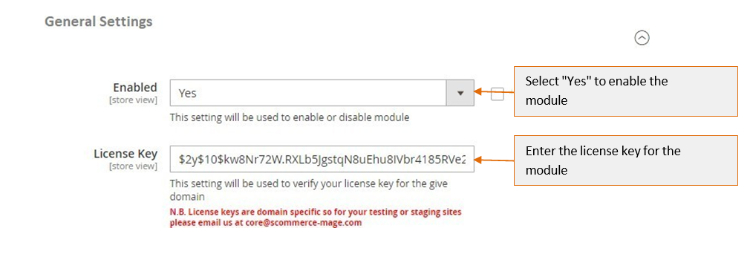
General Settings
- Module Enable - Select "Yes" or "No" to enable or disable the module.
- License Key -. Please add the license for the extension which is provided in the order confirmation email. Please note license keys are site URL specific. If you require license keys for dev/staging sites then please email us at support@scommerce-mage.com.
Order Archive Settings
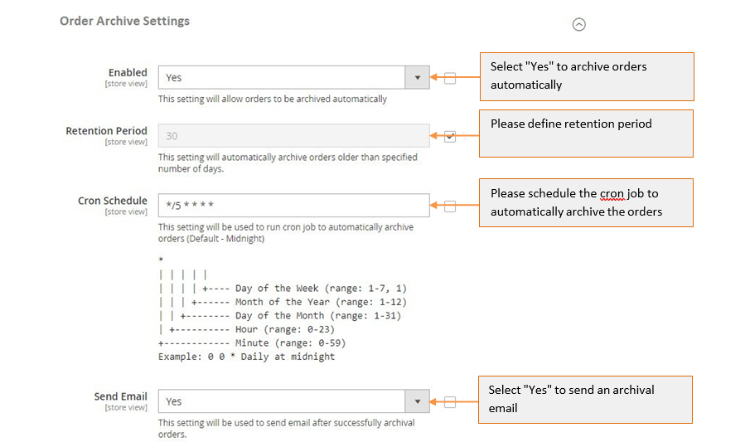
- Enabled (Yes / No) - Select "Yes" to archive orders automatically.
- Retention Period - Please define retention period. This setting will automatically archive orders older than specified number of days
- Cron Schedule - Schedule the cron job to automatically archive the orders (Default - Midnight)
- Send Email (Yes / No) - Select "Yes" to send email after successfully archival orders.
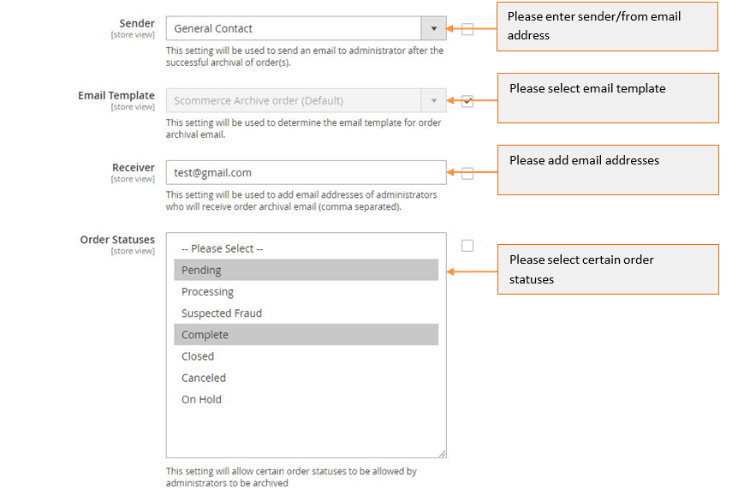
- Sender - Please enter sender/from email address to send an email to administrator after the successful archival of order(s).
- Email Template - Please select email template for order archival email.
- Receiver - Please add email addresses of administrators who will receive order archival email (comma separated).
- Order Statuses (Multi-select) - Please select certain order statuses to be allowed by administrators to be archived.
Order Delete Settings
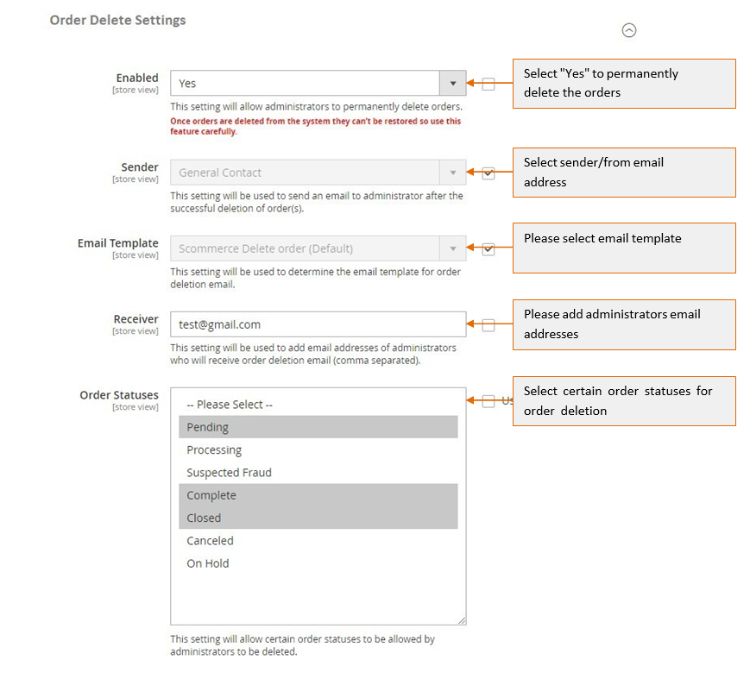
- Enabled (Yes / No) - Please select "Yes" or "No". If set to "Yes" then it will permanently delete orders.
- Sender - Please enter sender/from email address .
- Email Template - Please select email template for order deletion email.
- Receiver - Please add email addresses of administrator, who will receive order deletion email (comma separated).
- Order Statuses (Multi-select) - Please select certain order statuses for order deletion.
Order Grid
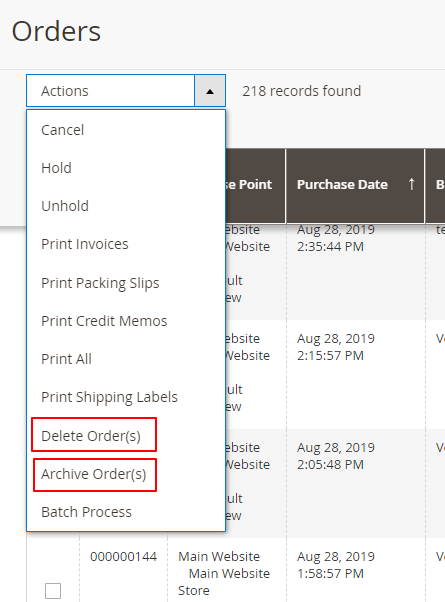
When you enable the "Order Archive" and "Order Delete" settings from Admin > Stores > Configuration > Scommerce Configuration > Archive Orders > Order Archive / Order Delete Settings > Enabled - "Yes" , then it adds two additional options "Archive" and "Delete " under the "Actions" drop-down at Admin > Sales > Order > Actions.
-
Archive - It moves/archives order(s) to another storage(archive grid) instead of deleting them. This action can be restored from the archive order view page.
-
Delete - It deletes order(s) permanently. The "Delete" action cannot be reversed and erases all order(s) and related information.
-
Archive or Delete Orders from Order View Page - You can delete and archive order(s) from, Admin > Sales > Orders > Select Order > View. The order view page will have two additional options "Delete" and "Archive" and using these two buttons you can perform "Delete" and "Archive" actions. Buttons will only be visible when the module is enabled and the administrator has right role to archive/delete order(s).

Archive Grid
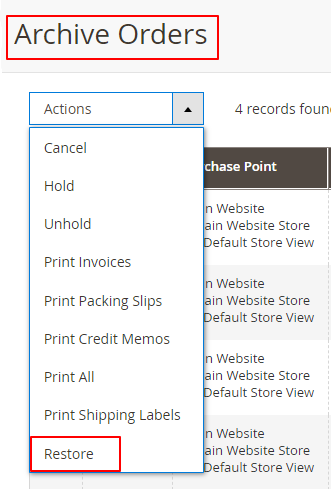
To view archived orders, go to Admin > Sales > Archive Orders. This grid will have an additional option "Restore "under "Actions" drop-down to restore the archived orders.
-
Restore - By selecting "Restore" from Admin > Sales > Archive Orders> Actions drop-down you can easily restore archived order(s).
-
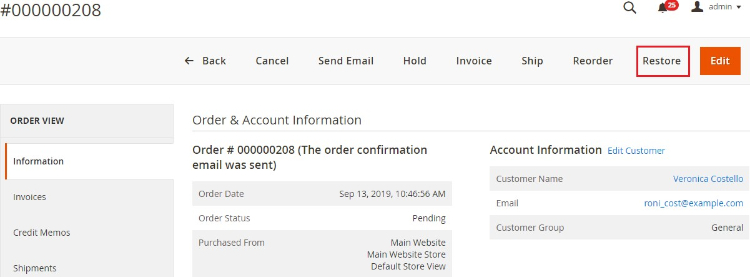
Restore Orders From Archived Order View Page - You can restore archived orders from Admin > Sales > Archive Orders > Select Order > View > Click "Restore".
Restore - It restores archived orders.
Automatically Archive Orders
When you enable the module and define the number of days for "Retention Period" from, Admin > Stores > Configuration > Scommerce Configuration > Archive Orders > Order Archive Settings, then it automatically archives order(s) older than defined days. After each successful order archival process, it sends an email to an administrator with details like how many numbers of orders being archived etc..
If you have a question related to this extension please check out our FAQ Section first. If you can't find the answer you are looking for then please contact support@scommerce-mage.com.