# Magento 2 Previously Ordered Products
### Installation and User Guide for Magento 2 Reorder Previous Products Extension
**Table of Contents**
1. [*Installation* ](#bkmrk-installation)
- *Installation via app/code*
- *Installation via Composer*
2. [*Configuration Settings for Reorder Previous Products* ](#bkmrk-configuration-settin)
- *General Settings*
3. *[Hide One or Multiple Columns from the Previous Purchases Grid](#bkmrk-hide-one-or-multiple)*
4. [*Front-end Site view* ](#bkmrk-front-end-siteview)
- *Previous Purchase Grid*
- *Hide Columns in the Previous Purchase Grid*
- *Add One or Multiple Products to Cart Directly From the Grid*
### Installation [](#bkmrk-)
- **Installation via app/code:** Upload the content of the module to your root folder. This will not overwrite the existing Magento folder or files, only the new contents will be added. After the successful upload of the package, run below commands on Magento 2 root directory.
```php
php bin/magento setup:upgrade
php bin/magento setup:di:compile
php bin/magento setup:static-content:deploy
```
- **Installation via Composer:** Please follow the guide provided in the below link to complete the installation via composer.
[https://docs.scommerce-mage.com/magento-2-extensions/installation-via-composer/installation-via-composer](https://docs.scommerce-mage.com/magento-2-extensions/installation-via-composer/installation-via-composer)
### Configuration Settings for Reorder Previous Products [](#bkmrk--1)
#### Go to Admin> Stores> Configuration> Scommerce Configuration> Global Site Tag (gtag.js)
#### General Settings [](#bkmrk--2)
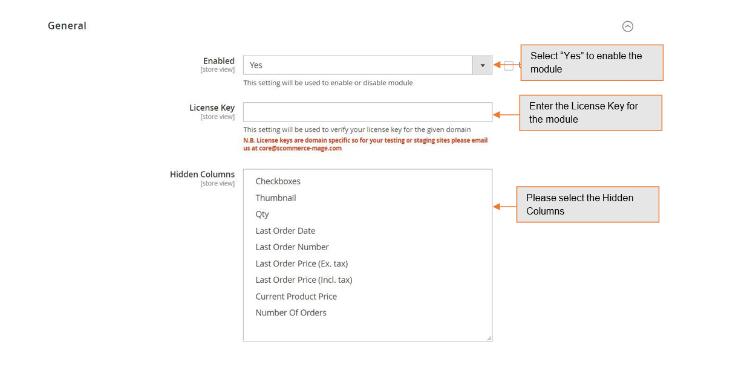
- **Enabled –** Select "Yes" or "No" to enable or disable the module.
- **License Key –** Please add the license for the extension which is provided in the order confirmation email. Please note license keys are site URL specific. If you require license keys for dev/staging sites then please email us at .
- **Hidden Columns –** You can hide one or multiple columns from the previous purchases grid. The columns that can be hidden are listed below:-
- #### Thumbnail
- **Qty**(Quantity)
- #### Last Order Date
- #### Last Order Number
- #### Last Order Price(Ex. tax)
- #### Last Order Price(Incl. tax)
- #### Current Product Price
- #### Number of Orders
[](https://docs.scommerce-mage.com/uploads/images/gallery/2025-05/image-48.jpg)
### Hide One or Multiple Columns from the Previous Purchases Grid [](#bkmrk--4)
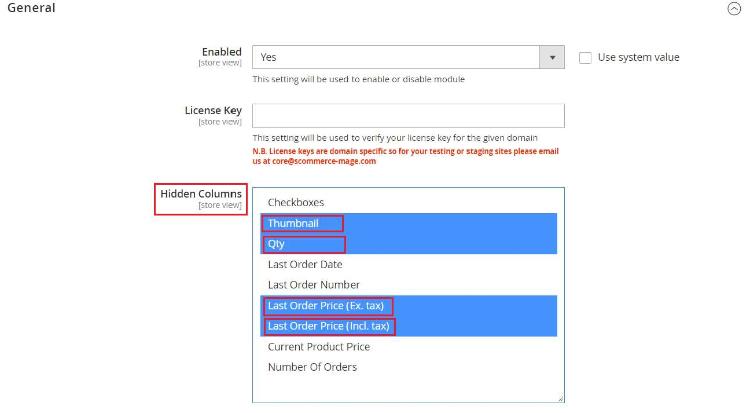
To hide one or multiple columns from the previous purchases grid please go to **Admin> Stores> Configuration> Scommerce Configuration> Previous Products.**Find the setting named Hidden Columns select one or multiple columns that you want to hide and save the settings.
[](https://docs.scommerce-mage.com/uploads/images/gallery/2025-05/image-49.jpg)
### Front-end Siteview [](#bkmrk--6)
#### Previous Purchase Grid [](#bkmrk--7)
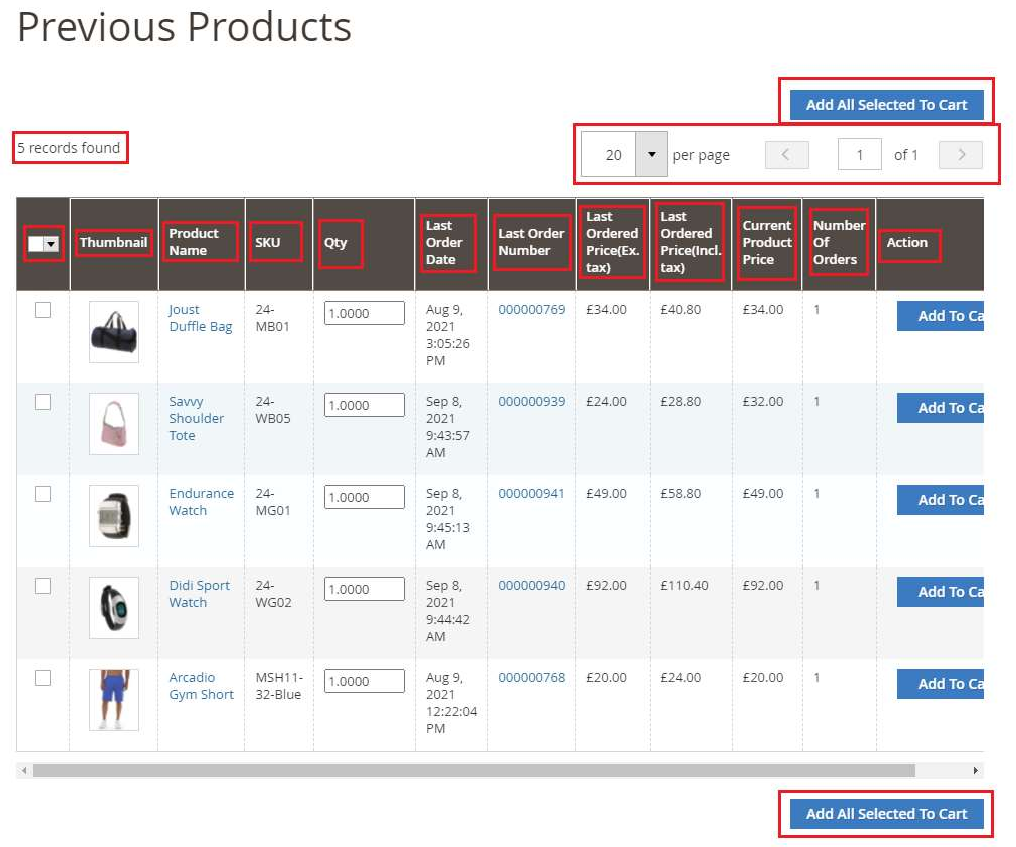
Go to the website and login to your account then navigate to **My Account** section and from the left menu click on My Previous Products. This grid shows detailed information about all off your previous purchases. You can easily navigate through the list with the help of pagination and selectors. The previous purchases grid will open as shown in the image below:-
[](https://docs.scommerce-mage.com/uploads/images/gallery/2025-05/image-68.png)
#### Hide Columns in the Previous Purchase Grid [](#bkmrk--9)
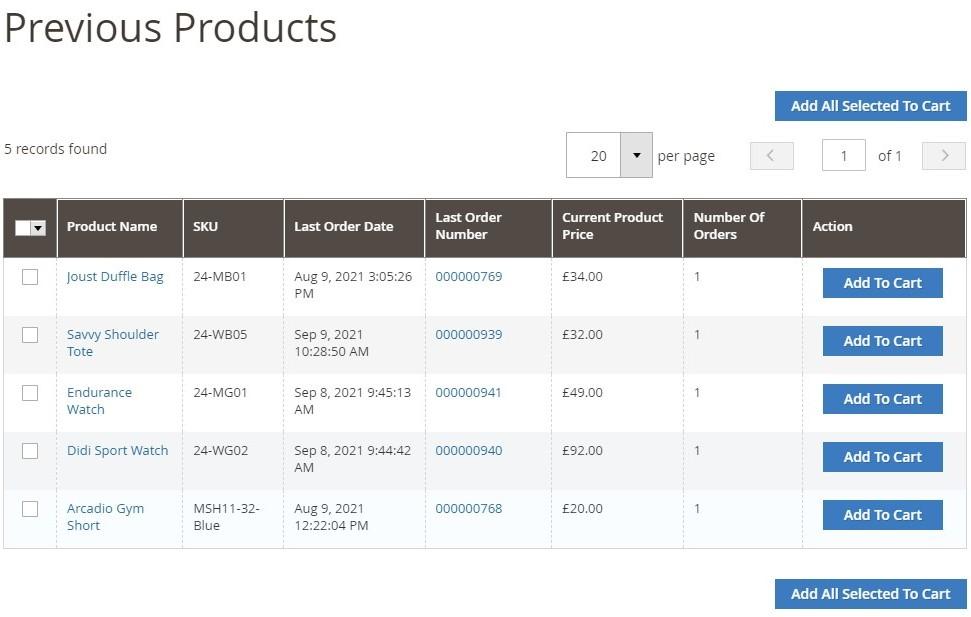
Please go to **Admin> Stores> Configuration> Scommerce Configuration >Previous Products** and select the columns in **Hidden Columns** that you want to hide. For eg:- we have selected Thumbnail, QTY, Last Order Price(Incl taxes) and Last Order Price(Excl Taxes).
[](https://docs.scommerce-mage.com/uploads/images/gallery/2025-05/image-50.jpg)
#### Add One or Multiple Products to Cart Directly from the Grid [](#bkmrk--11)
If you want to add one product to cart then click on the checkbox in the selector column then click on Add to Cart from the rightmost column Whereas if you want to add multiple products to cart then select the products that you want to purchase then click on the Add All Selected to Cart button either on the top or bottom of the list.
If you have a question related to this extension please check out our [**FAQ section**](https://www.scommerce-mage.com/magento2-reorder-previous-products.html#customfaq) first. If you can't find the answer you are looking for then please contact [**support@scommerce-mage.com**](mailto:core@scommerce-mage.com)**.**